
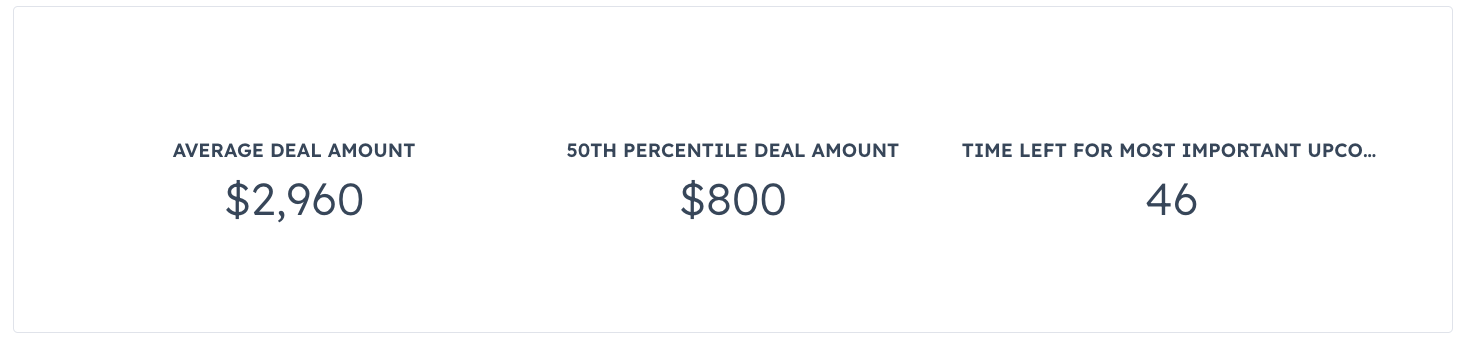
CrmStatistics component renders data summaries calculated from the currently displaying CRM record’s associations. For example, you can use this component to display data such as:
- The average revenue of all of a contact’s associated companies.
- The total number of times that a company has been contacted based on all of their associated tickets.
- The maximum number of days to close from all of a company’s associated deals.
Props
| Prop | Type | Description |
|---|---|---|
objectTypeId | String | The numeric ID of the type of object to fetch statistics about (e.g., 0-1 for contacts). See complete list of object IDs. |
statistics | Array | An array of objects that define each statistic to fetch. Supports the following fields:
|
Specifying statistics data
Using thestatistics prop, you’ll define the data that you want the component to display. Data is fetched from CRM properties, and is calculated based on the specified statisticType. You’ll include an object for each statistic that you want to fetch. You can also optionally specify filterGroups to further refine the data.
Below are the supported fields for objects in the statistics array.
| Field | Type | Description |
|---|---|---|
label | String | The label that displays above the statistic. |
propertyName | String | The name of the property to fetch data from. Must be a number, date, or datetime property. Requesting any other type of property will result in the statistic displaying -- for its value. |
statisticType | String | The type of statistic to request. Supported values include:
|
filterGroups | String | An optional field for further refining the values that are included in the statistic. Up to three filter group objects may be specified in this array, and you can include up to three filters in each item. Exceeding these limits will result in the statistic showing — for its value. Filters are structured the same way as filters in the CRM search API. |
percentiles | Number | When statisticType is PERCENTILES, this field is required. Specifies the percentile to display. Must be an integer from 0-100, inclusive. |