> ## Documentation Index
> Fetch the complete documentation index at: https://developers.hubspot.com/docs/llms.txt
> Use this file to discover all available pages before exploring further.
---
id: 1c3d2842-70da-4742-930b-b8f291a474b1
---
# Creating private apps with projects
> Learn how to create private apps using HubSpot developer projects.
You can build a private app with v2025.1 of the developer platform, which enable you to authenticate data fetch requests using their private app access token. Private apps can only be installed into the account where they're uploaded.
Legacy apps are still supported by HubSpot, but don't have access to the latest app features. Learn more about the [new developer platform](/docs/apps/developer-platform/overview).
Private apps built on 2025.1 of the developer platform do support serverless functions for UI extensions, but do not support features such as creating an [app settings](/docs/apps/developer-platform/add-features/ui-extensions/extension-points/create-a-settings-page) page.
If you have an existing project-built private app, you can migrate its functionality to the latest version of the developer platform by following the [migration guide](/docs/apps/developer-platform/build-apps/migrate-an-app/overview).
In your project's structure, a private app is stored in a folder that contains an `app.json` configuration file, and will also contain extension and serverless function files needed by the app. A project can contain multiple apps, and each app can contain multiple UI extensions.
In this guide, learn how to create a private app in a project and view it in HubSpot. Then, you can [create a UI extension within the app](/docs/apps/developer-platform/add-features/ui-extensions/ui-components/overview) to customize the CRM UI, or build [CMS React modules](/docs/cms/start-building/introduction/react-plus-hubl/modules).
**Please note:** building UI extensions for private apps in a standard HubSpot account requires an *Enterprise* subscription. However, you can try out building private apps using projects in [developer test accounts](/docs/getting-started/account-types#developer-test-accounts) for free.
## Create a private app within a project
To create a private app in a project, you'll first need to [install the HubSpot CLI](/docs/developer-tooling/local-development/hubspot-cli/install-the-cli).
Once you've installed the CLI, open a new terminal window, follow the steps below:
* To create a private app within your project, run the command below:
```shell theme={null}
hs project create --platform-version 2025.1
```
* When prompted, enter a **name** for your project, confirm the **folder** to create the project in, then select **CRM getting started with private apps** for the project template.
* A new project will be created with the name and location you provided. Run `cd [your-project-name]` to navigate into the working directory of the project.
* The project directory structure includes the following key files you'll use to configure your app:
### Project structure
```shell theme={null}
my-project-folder/
└── hsproject.json
└── src
└── app/
└── app.json
└── app.functions/
└── example-function.js
└── package.json
└── serverless.json
└── extensions/
└── assets/
└── example-card-preview.png
└── example-card.json
└── Example.jsx
└── package.json
└── webhooks/
└── webhook.json
```
### App configuration
The top-level configuration file for your project is located within the `src/app/` directory of your project, an `app.json` file. This file will contain your app definitions.
```json theme={null}
{
"name": "Get started App",
"description": "This is an example private app that shows a custom card on the Contact record tab built with React-based frontend. This card demonstrates a simple handshake with HubSpot's serverless backend.",
"uid": "get_started_app",
"scopes": ["crm.objects.contacts.read", "crm.objects.contacts.write"],
"public": false,
"extensions": {
"crm": {
"cards": [
{
"file": "extensions/example-card.json"
}
]
}
},
"webhooks": {
"file": "./webhooks/webhooks.json"
}
}
```
| Parameter | Type | Description |
| ------------- | ------- | ----------------------------------------------------------------------------------------------------------------------------------------------------------------------------------------------------------------------------------------------------------------------------- |
| `name` | String | A unique name for the app. |
| `description` | String | The app's description. |
| `scopes` | Array | The app's allowed [scopes](/docs/apps/developer-platform/build-apps/authentication/scopes). At least one scope is required. |
| `uid` | String | The app's uniquely identifying name. This can be any string, but should meaningfully identify the app. HubSpot will identify the app by this ID so that you can change the app's `name` locally or in HubSpot without removing historical or stateful data, such as logs. |
| `public` | Boolean | Set to `false` for private apps. |
| `extensions` | Object | Contains the extensions included in the app. For app cards, include a `crm` object, followed by a `cards` array that contains a `file` field that references the card's JSON configuration file. If you have not yet defined your extension, you can leave this object empty. |
| `webhooks` | Object | Contains a single sub-property, `file`, which is the path to a webhooks configuration file in your project. |
## Review example serverless function
Within the boilerplate private app, you'll find an example [serverless function](/docs/apps/legacy-apps/private-apps/build-with-projects/serverless-functions) that you can eventually adapt as your UI extension's back end. Serverless function files are stored in a separate `app.functions` directory within the `app/` folder, which contains the following files:
* **serverless.json**: configuration file that points to your serverless function definition `.js` file, and defines any [secrets](#managing-secrets) your serverless function requires.
* **package.json**: provides metadata about your serverless function metadata and dependencies. By default, the Axios library and the HubSpot Node.js client library are bundled as dependencies.
* **example-function.js**: an example serverless function file to get you started.
Check out the [serverless functions guide](/docs/apps/legacy-apps/private-apps/build-with-projects/serverless-functions) to learn more about authenticating calls, managing secrets, debugging, and more.
### serverless.json
```json theme={null}
{
"appFunctions": {
"myFunc": {
"file": "example-function.js",
"secrets": []
}
}
}
```
| Parameter | Type | Description |
| -------------- | ------ | ---------------------------------------------------------------------------------------------------------------------------------------------------------------------------------------------------------------------------------------------------------------- |
| `appFunctions` | Object | The object that contains definitions for each serverless function. |
| `myFunc` | Object | The object containing the name of the serverless function `file` along with any secrets needed for authenticating requests in the `secrets` array.`myFunc` can be any value. You'll later reference this name when running the function in your React front end. |
### package.json
```json theme={null}
{
"name": "demo.functions",
"version": "1.0.0",
"description": "",
"main": "index.js",
"scripts": {
"test": "echo \"Error: no test specified\" && exit 1"
},
"author": "",
"license": "ISC",
"dependencies": {
"@hubspot/api-client": "^7.0.1",
"axios": "^0.27.2"
}
}
```
### example-function.js
```js theme={null}
exports.main = (context = {}, callback) => {
const { text } = context.parameters;
const ret = `This is coming from a serverless function! You entered: ${text}`;
try {
callback(ret);
} catch (error) {
callback(error);
}
};
```
## Configuring webhooks
The boilerplate project includes a webhook configuration file, `webhooks.json`, within the `webhooks` directory. Several webhook subscriptions are already defined, including triggers for changes to the `firstname` and `lastname` properties for contacts, contact creation, and contact deletion events.
**Please note:**
* The default `targetUrl` in the `webhooks.json` configuration is set to `http://example.com/webhook`, so you'll need to update the `targetUrl` to point to a URL for a backend service that you own.
* Each of the example subscriptions in `webhooks.json` is set to `active` by default. If you're not ready to set up webhooks when you first upload your project, set each of the `active` properties to `false`, or remove the `webhooks` directory entirely before you upload your project to HubSpot.
Learn more about configuring webhooks for a [project-built private app](/docs/apps/legacy-apps/private-apps/build-with-projects/configure-webhooks).
## Upload your project to HubSpot
After you've reviewed the default contents of your project, you can upload the project to HubSpot using the `hs project upload` command.
On upload, the build will be triggered and HubSpot will validate your project files and provision any needed resources. By default, HubSpot will automatically deploy successful builds.
With your app uploaded, learn how to view it in HubSpot below. Then, [create a UI extension](/docs/apps/developer-platform/add-features/ui-extensions/ui-components/overview) in the app to customize CRM records with various UI components.
## View the app in HubSpot
If you're a [Super admin](https://knowledge.hubspot.com/user-management/hubspot-user-permissions-guide#super-admin), you can access and manage private apps in your HubSpot account, including viewing your apps, their build history, and the access token required to [make API calls](/docs/apps/legacy-apps/private-apps/overview#make-api-calls-with-your-app-s-access-token).
To view a private app's details in HubSpot:
* In your HubSpot account, navigate to **Development**.
* In the left sidebar menu, navigate to **Legacy apps**.
* Click the **name** of the private app.
You'll then be taken to the app's home page where you can view and manage its access token, view request logs and included extensions, and delete the app. Learn more about each tab below.
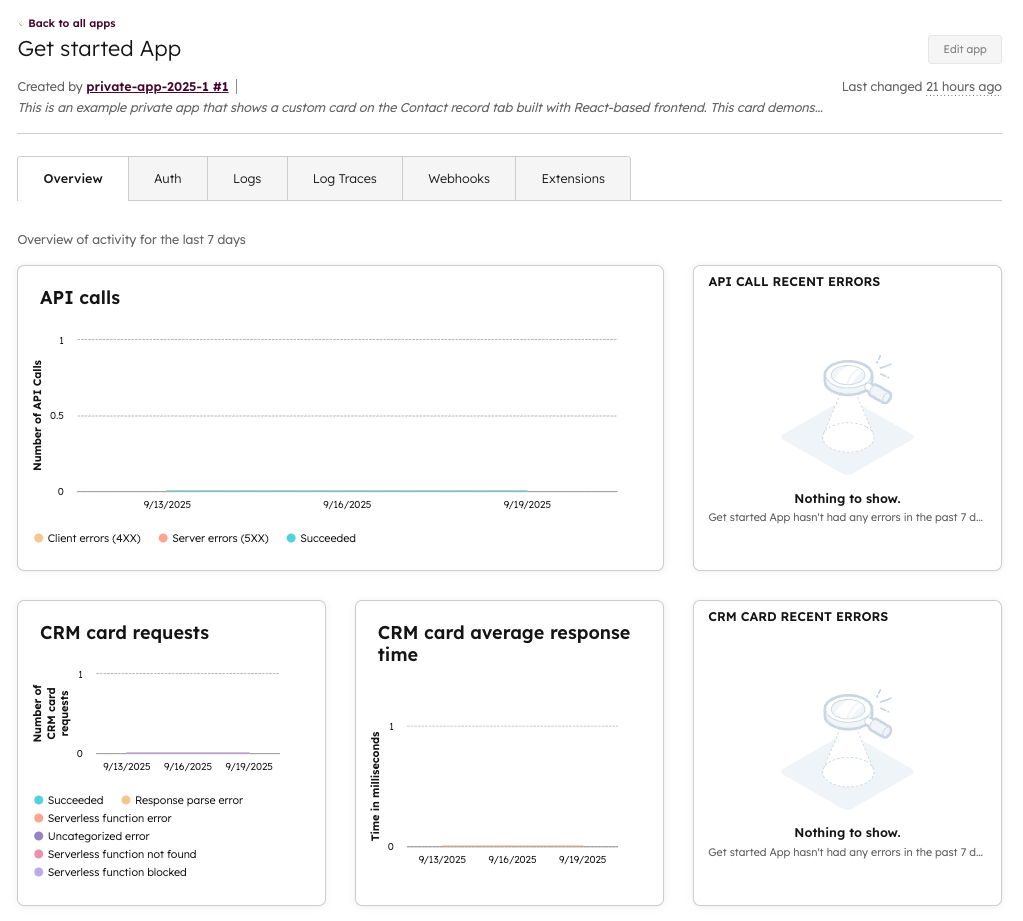
### Overview
On the *Overview* tab, review high-level information about the app's API calls and extension requests and responses.
### Auth
On the *Auth* tab, view authentication-related information, such as the private app's access token and scopes. You can also delete the app from this page.
### Logs
On the *Logs* tab, view detailed information about the app's various calls and events. The tabs under the *Logs* tab break down different types of events that occur while the app is running, and are helpful for debugging errors that your app might run into. Learn more about [serverless function debugging](/docs/apps/legacy-apps/private-apps/build-with-projects/serverless-functions#debug-a-serverless-function).
* **API calls:** click the **API calls** tab to view logs for API calls made by the app.
* **Endpoint functions:** click the **Endpoint** **functions** tab to view logs for serverless endpoint functions included in the app. You can view further event details by clicking an **event row**. Log details will be displayed in a panel on the right, and will include a *View log trace* link that you can click to view the log track, along with a *Trade ID* that you can copy for use on the [*Log Traces*](#log-traces) tab.
* **Serverless functions:** click the **Serverless functions** tab to view logs for serverless app functions included in the app. You can view further event details by clicking an **event row**. Log details will be displayed in a panel on the right, and will include a *View log trace* link that you can click to view the log track, along with a *Trade ID* that you can copy for use on the [*Log Traces*](#log-traces) tab.
* **Extensions:** click the **Extensions** tab to view React top-level event logs, such as a UI extension successfully loading. Click an **event row** to view log details, including the user who initialized the request. Log details will also include a *View log trace* link that you can click to view the log trace, along with a *Trace ID* that you can copy for use on the *Log Traces* tab.
* **Security:** click the **Security** tab to view security-related events, such as private app access token viewing and rotating.

As an example, say your app is running into an error when trying to retrieve company proximity information through a serverless function. To troubleshoot this error:
* Click the **Logs** tab, then click the **Serverless functions** tab.
* Then, click the **errored request** to view the log output in the right panel. In the panel, you can then click **View log trace** for more information.
* Alternatively, you can click **Copy Trace ID** in the log output panel, then use the ID in the *Log Traces* tab.
### Log Traces
On the *Log Traces* tab, view log traces by trace ID, which you can retrieve from log outputs on the [*Logs*](#logs) [tab](#logs). Log tracing enables you to trace front-end and back-end logs with a single ID, making it easier to debug issues happening in production.
You can also retrieve log IDs on CRM record pages where an extension has failed to load. This can be especially useful if your extension includes [custom log messages](/docs/apps/developer-platform/add-features/ui-extensions/ui-extensions-sdk#send-custom-log-messages-for-debugging).
The banner below provides an example of an issue rendering a UI extension, and includes a trace ID that the user can report back to help you troubleshoot the problem.

### Extensions
On the *Extensions* tab, view information about the extensions that are included in the app. Learn more about creating [UI extensions](/docs/apps/legacy-apps/private-apps/build-with-projects/create-ui-extensions) for a project-built private app.