
Supported products
Supported products
Prerequisites
- The HubSpot CLI installed and authenticated.
- A Revenue Hub Professional or Enterprise account.
- Familiarity with React and CMS React modules.
Download the example project
To get started, download HubSpot’s quote-dev-starter project from GitHub. It contains a working example of a typed React module that pulls quote and CRM data from HubL and hydrates an interactive island on the client. This will also run apostinstall step to install dependencies in src/cms-assets/my-react-assets/.
src/cms-assets/my-react-assets
Globals.d.ts
components/modules/QuoteExampleModule
index.tsx
islands
InteractiveButton.tsx
index.tsx: the module entry point. Exports the ReactComponent,fields,meta, andhublDataTemplate. This is where you define what data the module receives and how it renders.islands/InteractiveButton.tsx: a client-hydrated Island component that adds interactivity to the published quote.Globals.d.ts: type declarations for the project. The@hubspot/quote-dev-sdkpackage provides theQuoteTemplateContexttype used in the module, which gives you compile-time safety against thequoteTemplateContextshape available in HubL.
Review the example module
Module configuration
The module’smeta export sets its label and the content types it supports. Both QUOTE and QUOTE_BLUEPRINT are required.
index.tsx
STYLE tab for appearance options:
index.tsx
Accessing quote data
ThehublDataTemplate export is a HubL string that runs server-side and passes data into your React component via props.hublData. The example uses it to extract specific values from quoteTemplateContext and to fetch data using the crm_object() HubL function:
index.tsx
hublDataTemplate demonstrates a few key patterns:
- Targeted data:
hublDatais built as a specific object with only the values the component needs, rather than passing the entirequoteTemplateContext. This keeps the quote clean by only exposing the properties needed. - Fetching data: the example uses
crm_object()to fetch specific property values (nameanddomain) from the associated company. You can use HubL functions such ascrm_object()andcrm_associations()to fetch data beyond what’s available directly inquoteTemplateContext. - Conditional rendering: within
hublData, theis_in_editorflag is passed to React so that the component can adjust its rendering in the editor context. See Adding client-side interactivity for more information.
Providing fallback data for templates
isQuoteBlueprint is a HubL global variable that is true when the module is rendered inside a quote template rather than an individual quote. Since quote templates are not attached to a real quote, properties like company name will be empty.
The example handles this by substituting placeholder values (e.g., HubSpot) when isQuoteBlueprint is true:
index.tsx
Adding client-side interactivity
React modules use server-side rendering. To add client-side interactivity, you can use islands, which hydrate server-rendered HTML with client-side JavaScript. The example project includes a simple button as an island (InteractiveButton.tsx), which is a standard React component with client-side state:
InteractiveButton.tsx
index.tsx: once as a plain component (for static rendering in the editor), and once with the ?island suffix (for client-side hydration when live):
index.tsx
Passing data props
Any props you pass to anIsland are serialized into the page HTML so the component can hydrate on the client. This means island prop values are visible to anyone who views the source code of the published quote page. Because quote data can include sensitive information such as line item pricing, customer details, and custom CRM properties, you should pass only the specific property values your island needs to render.
For example, to make the quote title available to an island, pass the hs_title string:
index.tsx
quoteTemplateContext as shown below would expose all quote and associated object properties on the rendered page:
index.tsx
Conditional rendering
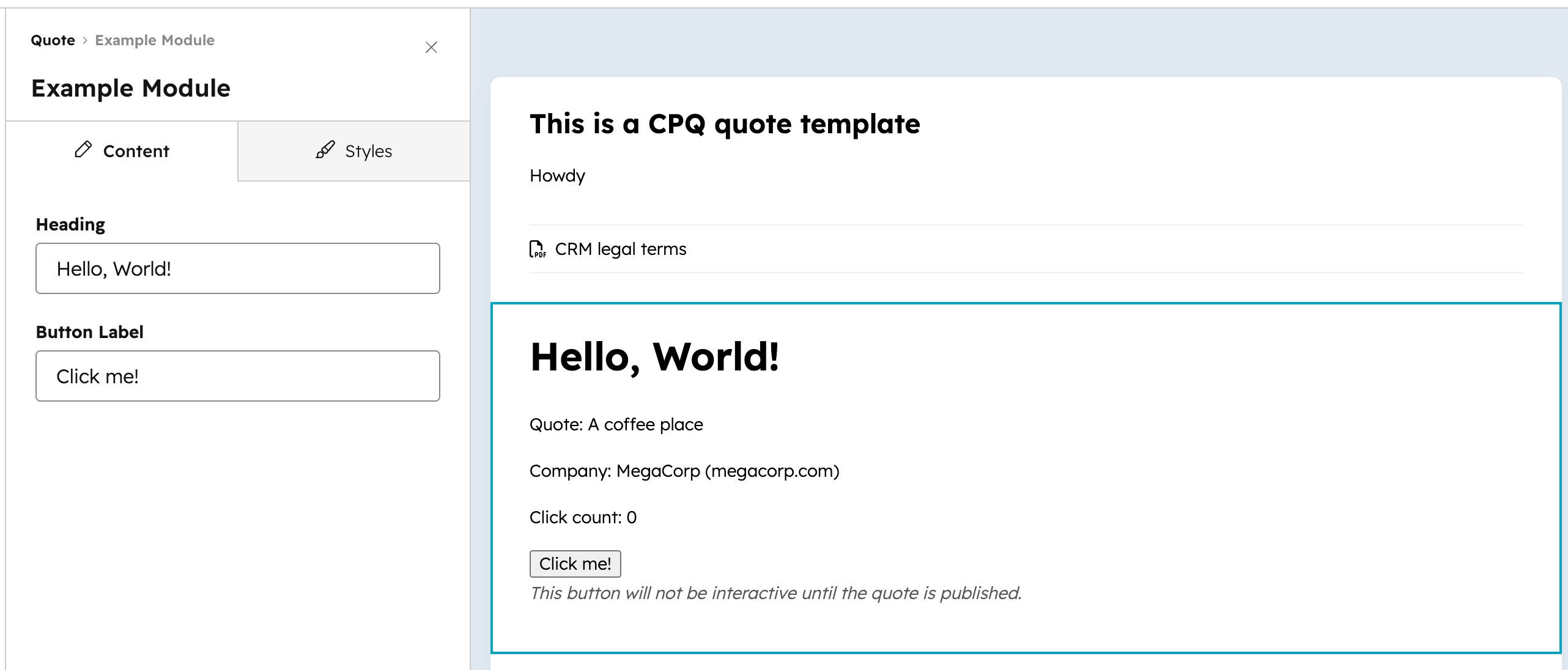
Because islands cause full quote preview reloads in the editor (rather than per-module hot reloads), the example island prevents rendering in the editor context using theisInEditor flag. Instead, it renders a static version of the button component with an explanatory note:
index.tsx
isInEditor flag comes from hublData, where it’s set in hublDataTemplate as is_in_editor.
index.tsx
is_in_previewer variable. This is recommended for modules where the client-side interactivity writes data, as it prevents the quote author from accidentally changing something before publishing.
Rendering for print and PDF
Quotes are web pages that users can save and share as PDFs. When generating a PDF, HubSpot renders the quote with a?print=true query parameter in the URL. You can check for this parameter in island components to skip interactive behavior that doesn’t make sense in a static document.
For example, a navigation island that scrolls buyers to sections of the quote should be hidden when printing:
QuoteNav.tsx
@media print CSS media query. For example, to hide a navigation element that only makes sense in the browser:
Control acceptance and payment state
@hubspot/quote-dev-sdk provides two hooks for reading and controlling the live acceptance and payment state of a quote from within a custom module:
Both hooks must be used inside an island component, since they rely on client-side events.
These hooks require
@hubspot/quote-dev-sdk v0.2.0 or later.useQuoteAcceptance
The useQuoteAcceptance hook returns { loading, error, data, control }.
data contains the following:
control exposes enable() and disable({ reason? }). Note that disable() will have no effect when accepted is true or when acceptanceMethod is 'print_and_sign'.
The starter project’s RequiredAgreementModule shows a complete working implementation. The module is split across two component files: a parent index.tsx that detects the editor context and wraps the interactive piece in an Island, and islands/TermsAcceptance.tsx, which contains the hook logic. The island renders a terms checkbox and calls control.disable() or control.enable() based on the buyer’s input:
The
isInEditor prop is passed in from the parent index.tsx, which calls useEditorVariableChecks() to detect the HubSpot page editor context. The guards in useEffect and handleChange prevent the hook from firing during editor previews.useQuotePayment
The useQuotePayment hook returns { loading, error, data, control }.
data contains the following:
control exposes enable() and disable({ reason? }). Note that disable() will have no effect when status is 'PAID' or 'PROCESSING'.
Upload the project
To upload the example project to your HubSpot account, run the following CLI command:Add the module to a quote
To see your module in the quote editor:- In your HubSpot account, navigate to Commerce > Quotes.
- In the upper right, click Create quote, then select Create quote.
- In the right panel, select a deal and quote template to use for the quote. Then, click Create quote.
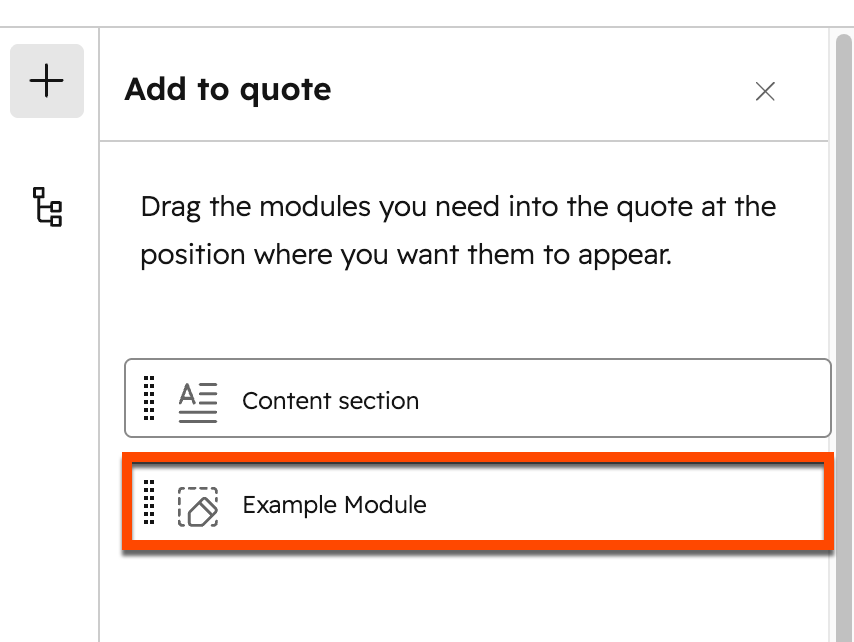
- In the left sidebar of the quote editor, click the plus icon.
- Drag and drop the Example Module into the quote.
Published quote behavior
Quotes are rendered once at the time of publish. Keep the following in mind when updating or removing custom modules:- If you deploy a new version of a custom module, the changes will apply to future quotes and any unpublished drafts, but not to quotes that have already been published.
- If you delete or remove a custom module from the project, it will affect unpublished quotes and templates that use it. Published quotes will not be affected. Learn more about deleting and restoring modules.
Delete and restore modules
Impact of deleting a module
When you deploy a new build with a module removed from the project:- The module is no longer available when creating new quote templates or quotes.
- Existing published quotes are unaffected until they are recalled.
- Templates or draft quotes that use the deleted module will automatically have the module removed. When a user edits one of these templates or draft quotes, an alert will be shown informing them about the deletion.
Restore a deleted module
Once a module is deleted through a deploy, it cannot be restored by adding the module file back to your local project and re-uploading. Instead, deploy an older build that still contains the module through the projects UI in HubSpot. This makes the module available again so it can be added to new quote templates and quotes. However, templates or draft quotes that were already saved with the module removed will not have the module added back automatically — the module must be re-added to those templates or drafts manually.- In your HubSpot account, navigate to Development. Then, click the name of your project.
- Click the Builds & Deploys tab.
- Find the build that contains the module you want to restore, then click Deploy.
- Before your next CLI upload, ensure your local project includes the original module file and any changes from newer builds so they aren’t lost on the next deploy.