
Scope requirements
Scope requirements
Webhook details
To get the phone numbers available for channel connection, HubSpot will send aPOST request to your registered webhook with the following request body parameters:
The request will also include HubSpot signature headers to prove that the request came from HubSpot. Learn how to validate requests.
Expected response schema
The endpoint that you provide to HubSpot should return a JSON-formatted response that provides a list of available phone numbers. Each phone number in the list should include the following fields:
For example, if your phone number is 18001231234, your extension is 1, and you want to label this number “My cell phone number”, the response you send back to HubSpot should be:
Manage the webhook settings for channel connection
The following endpoints are available to specify the webhook URL for your channel connection settings, as well as specify whether your webhook is ready to be released to users via theisReady flag.
Create channel connection settings
To create channel connections settings, use the appId of your public app to make aPOST request to crm/extensions/calling/2026-09/{appId}/settings/channel-connection, and include the following in your request body:
For example, if your endpoint URL was
https://example.com/my-help-desk-service and you wanted to make it available immediately for HubSpot to call, the request body would be:
Fetch existing channel connection settings
To fetch existing channel connection settings, use the appId of your public app to make aGET request to crm/extensions/calling/2026-09/{appId}/settings/channel-connection
If your channel connection settings were already set up correctly, the response will resemble the following:
Update channel connections settings
To update channel connections settings, make aPATCH request to crm/extensions/calling/2026-09/{appId}/settings/channel-connection, and include one or both of the following fields in your request body:
Delete existing channel connection settings
To delete existing channel connection settings, use the appId of your public app to make aDELETE request to crm/extensions/calling/2026-09/{appId}/settings/channel-connection
A successful DELETE call will result in a 204 No Content success status response code.
Understand the isReady flag
A third-party calling app is considered to support channel connection when the app has a webhook registered that’s marked withisReady=true. If your app supports third-party connections, all users who have this app installed will have the option to select the app when they connect a number to their help desk. Registering your webhook with isReady=false at first allows you to register the webhook and test it out without releasing it to all the users of your application immediately. To test your webhook’s help desk channel connection, you can override the isReady flag in-browser by setting local storage flag LocalSettings:Calling:supportsChannelConnection=true (see below). Once you have determined that the webhook’s help desk channel connection is working properly and you’re ready for users to use your webhook, you can send a PATCH request to update the isReady flag to true and release the functionality to users.
User experience
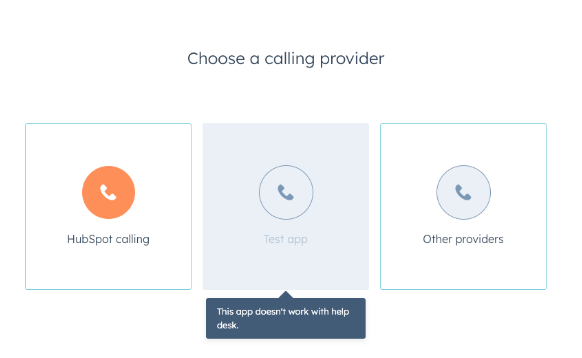
Below are some examples of the user experience when choosing a calling provider for help desk. Learn more about the user experience.- If
isReady=falseand local storage flag isfalse: the app will appear greyed out for users when choosing a calling provider.
- If
isReady=trueor local storage flag istrue, the users will be able to select the app when choosing a calling provider.
