The ToggleGroup component renders a list of selectable options, either in radio button or checkbox form.
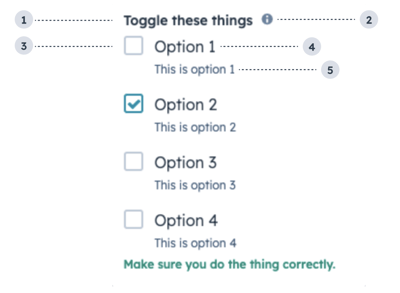
- Group label: the text that displays above the group of checkboxes.
- Tooltip: on hover, displays additional information about the field.
- Unchecked checkbox: an unselected checkbox.
- Option label: the text that displays next to the checkbox.
- Option description: the text that displays below the option label to describe the option.
import { ToggleGroup } from "@hubspot/ui-extensions";

const options = [1, 2, 3, 4].map(n => ({
  label: `Option ${n}`,
  value: `${n}`,
  initialIsChecked: n === 2,
  readonly: false,
  description: `This is option ${n}`,
}));

const Extension = () => {
  return (
    <ToggleGroup
      name="toggle-checkboxes"
      label="Toggle these things"
      error={false}
      options={options}
      tooltip="Here's a secret tip."
      validationMessage="Make sure you do the thing correctly."
      required={false}
      inline={false}
      toggleType="checkboxList"
      variant="default"
    />
  );
};
Props
| Prop | Type | Description |
|---|
error | Boolean | When set to true, validationMessage is displayed as an error message if provided. The input will also render its error state to let the user know there is an error. If left false, validationMessage is displayed as a success message. |
inline | Boolean | When set to true, stacks the options horizontally. Default is false. |
label | String | The text that displays above the toggles. |
name | String | The input’s unique identifier. |
onChange | (checked: boolean) => void | A function that is invoked when the toggle is clicked. |
options | Array | An array of options to display in the group. Each object in the array contains:label (string)value (string)initialIsChecked (boolean)readonly (boolean)description (string)
|
readonly | Boolean | When set to true, users will not be able to select the toggle. Default is false. |
required | Boolean | When set to true, displays a required indicator next to the toggle group. Default is false. |
toggleType | 'radioButtonList' | 'checkboxList' (default) | The type of toggle, whether checkboxes or radio buttons. Radio buttons only allow one option to be selected. |
tooltip | String | Text that will appear in a tooltip next to the toggle group label. |
validationMessage | String | The text to display if the input has an error. |
value | String | The value of the toggle group.- Accepts a string when
toggleType is radioButtonList. - Accepts an array when
toggleType is checkboxList.
|
variant | 'default' (default) | 'small' | The size of the toggle. |
Variants
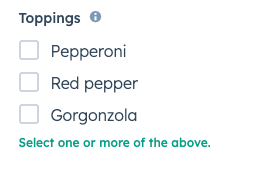
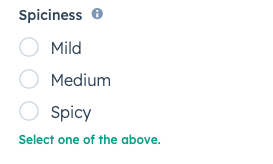
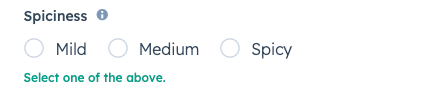
By default, the toggle group will render as a vertical list of checkboxes. Using the toggleType prop, you can set the options to display as checkboxes or radio buttons. You can also use the inline prop to stack options horizontally.
toggleType='checkboxList' (default)toggleType='radioButtonList'Usage examples
- A radio button list to enable salespeople to select one of four sales packages for a new customer.
- A checkbox list to enable customer support reps to select several options of swag to send to a delightful customer.
Guidelines
- DO: use this component when the user has a small selection of items to choose from. For longer lists of options, consider using the Select component instead.
- DO: keep label options concise when possible.
- DON’T: use toggle groups to display long lists of options.
Last modified on January 9, 2026