
Supported products
Supported products
- Collect and store data in HubDB or the HubSpot CRM
- Run complex data calculators
- Dynamically fetch and display data from external systems
- Send form data to external systems
You may also want to check out the getting started with serverless functions
guide,
as well as the serverless functions reference
documentation.
Limits
Serverless functions are intended to be fast and have a narrow focus. To maintain performance, serverless functions built with developer projects are limited to:- 15 seconds of execution time per function.
- a content type of
application/jsonfor requests that include a body. Form posts (application/x-www-form-urlencoded) return a415response.
429 response. Functions may also experience cold starts after periods of inactivity, so keep them lightweight. Learn more about limits in the reference documentation.
Building functions
There are two methods for building serverless functions and making them available for your CMS website: developer projects and the design manager. Build new functions with developer projects. Design manager functions are being sunset.Developer projects
You can use the developer platform to build and deploy an app with serverless functions defined within it. Project-based serverless functions can include third-party dependencies from npm, and can use the app’s built-in access token for HubSpot API scopes rather than managing tokens through secrets. Build serverless functions on the latest version of the developer platform (2026.09 at the time of writing). Check developer platform versioning for the current version.
Serverless functions belong to an app with static auth and private distribution, in the app’s functions directory. Each function is a pair of files:
*-hsmeta.json: the function’s configuration file, which includes its unique identifier, the path to its JavaScript file, the secrets it uses, and its endpoint path and methods..jsfile: the code that gets executed when the function is invoked. You’ll specify the file’s path in the*-hsmeta.jsonfile.
package.json file in the same directory configures the dependencies for every function in it.
Design manager
Serverless functions for the CMS were originally built in the design manager, before HubSpot’s developer projects platform was released. These functions are built locally, then uploaded to the design manager with the CLI instead of a project. They’re served fromhttps://<domain>/_hcms/api/<endpoint>, and they can’t include third-party dependencies.
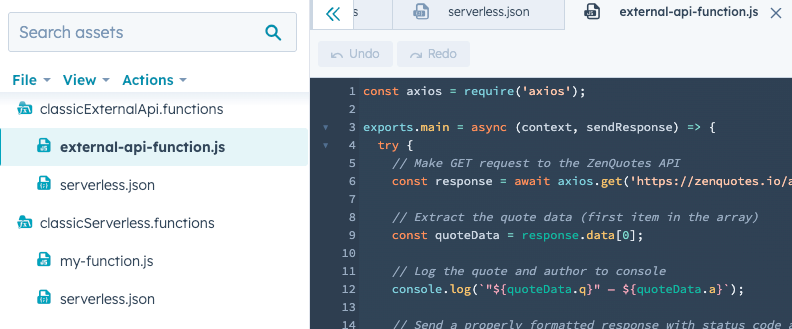
A design manager function lives in a .functions directory, which can have any name that ends in .functions. The directory contains a serverless.json configuration file and the JavaScript files for each endpoint. Design manager functions have a maximum of 10 seconds of execution time. Learn more in the design manager serverless functions reference.
Authentication
There are two ways to authenticate requests made by serverless functions: the app’s access token and secrets.- App access token: because project-based serverless functions are part of an app, every function can read the app’s access token with
process.env.PRIVATE_APP_ACCESS_TOKEN. Requests have access to the scopes in the app’srequiredScopes. The token is available once the app is installed in the account withhs project install-app. Calls authenticated with the token count against your API call limits. - Secrets: create secrets using the CLI (
hs secret add <NAME>) to store credentials securely in HubSpot. You can make a secret available to a function by including the secret’s name in theconfig.secretKeysarray of the function’s*-hsmeta.jsonfile. Learn more about authentication in the reference documentation.
Debugging
Project-based serverless functions
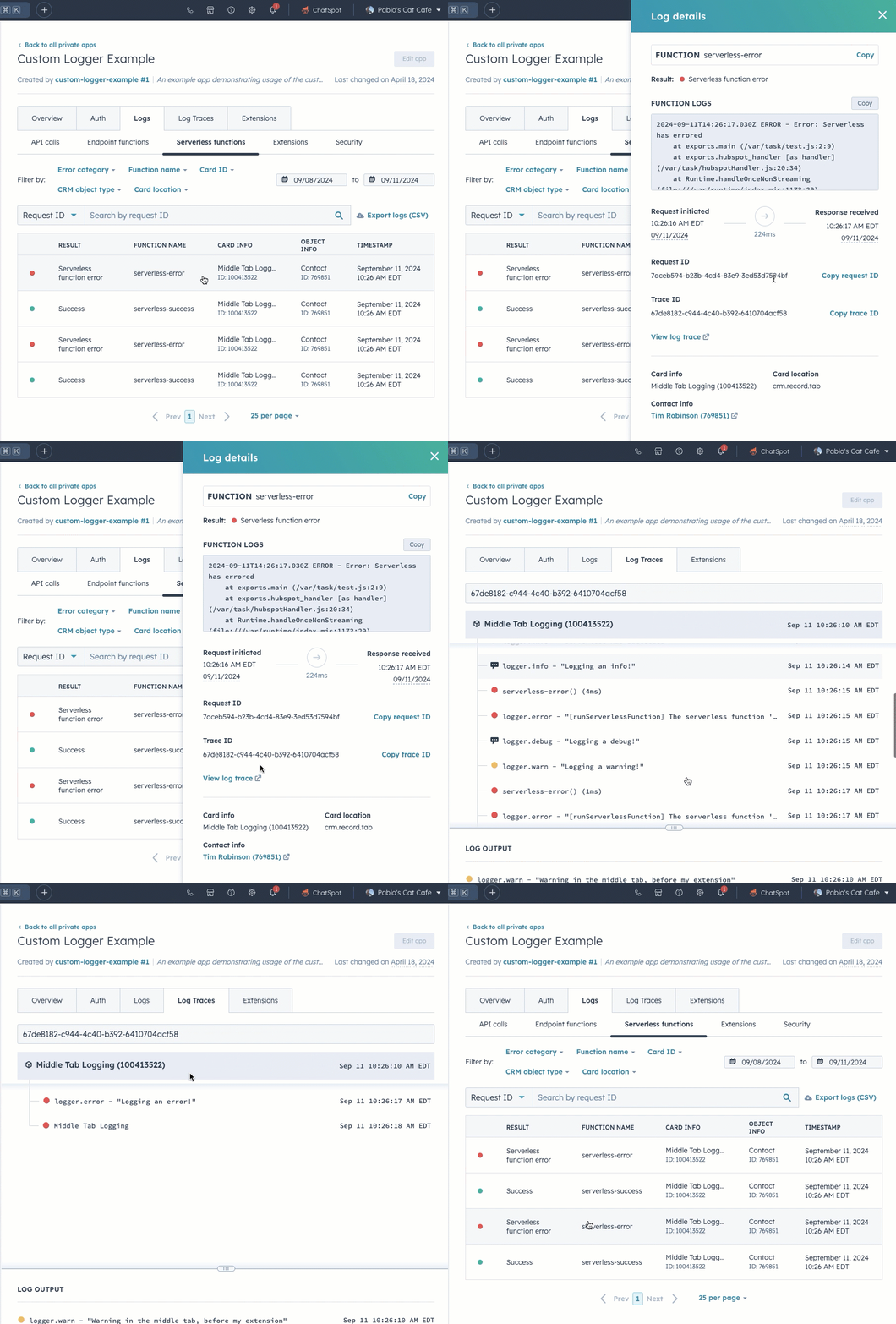
Log messages are produced every time HubSpot executes a serverless function, including successful requests and errors. To access a serverless function’s logs in HubSpot:- From the project directory, run
hs project opento open the project in HubSpot. - Open the app that contains the serverless function.
- Click the Logs tab.
- View logs for specific requests by clicking the request. You can also use the search bar to search by request ID.
- In the right panel, you can then click View log trace for a more in-depth breakdown of the request.
console.log() in your serverless function code for debugging purposes, then view its output in the function’s log details. Note that the message will not log directly to your browser console. Running hs project logs --function <uid> in the CLI prints a link to the logs, but doesn’t show log lines for public functions.
For example, your serverless function JavaScript might include:
console.error() message logged as an error.
Design manager serverless functions
To help with troubleshooting your design manager serverless functions, the CLI has anhs cms function logs <endpoint> command which gives you the ability to view your function’s logs. In addition to individual function invocation responses, time of execution, and execution time, any console.log statement will also appear in function logs. Do not console.log secrets like API keys.